No. 01 — The Sets
One set for every project.
An editorial, a client, a campaign: every project is a set, with its own photos, progress bar, and cover image of your choice. Sort by date, by how many are left to post, or drag and drop to reorder manually.
- Import from your camera roll, straight into the set
- Cover and published/to-be-published status with a long press
- Manual sorting by date or by what’s left to do
No. 02 — Frequency
You decide the frequency; Obscura calculates the date.
Two posts a week, or everything online by a certain date: set your goal, and the completion date updates as you move the slider. Photos from the same outing count as a single post, up to ten—the limit for an Instagram carousel.
- “Weekly Frequency” or “By a Specific Date”
- Photos per outing: single or carousel of up to 10
- Reminder for the next scheduled outing
~2/week Frequency to finish by July 24
- 18 photos remaining · about 6 posts
- 3-photo carousel
- Reminder for the next post
No. 03 — Today
A photo—or a carousel—with a pre-written caption.
Obscura suggests what to post today, in the right order for the carousel, with a pre-written caption: copy it as is or rewrite it. Then “Mark as published,” and the next post will recalculate automatically.
- Caption generated from the set, editable, with “Restore”
- Library of reusable caption templates
- Just one red dot: when you’re behind on your posting schedule
No. 04 — Grid preview
A preview of your profile grid.
A 3×3 preview shows how the profile grid will look with the cover images of upcoming posts—the most recent one in the top left, just like on Instagram. And today’s carousel can be rearranged by dragging the photos before posting.
- Drag to change the order of the carousel
- 3×3 preview with the cover images of upcoming posts
- Preview only: a look at the grid before publishing
How it will look
No. 05 — Censorship
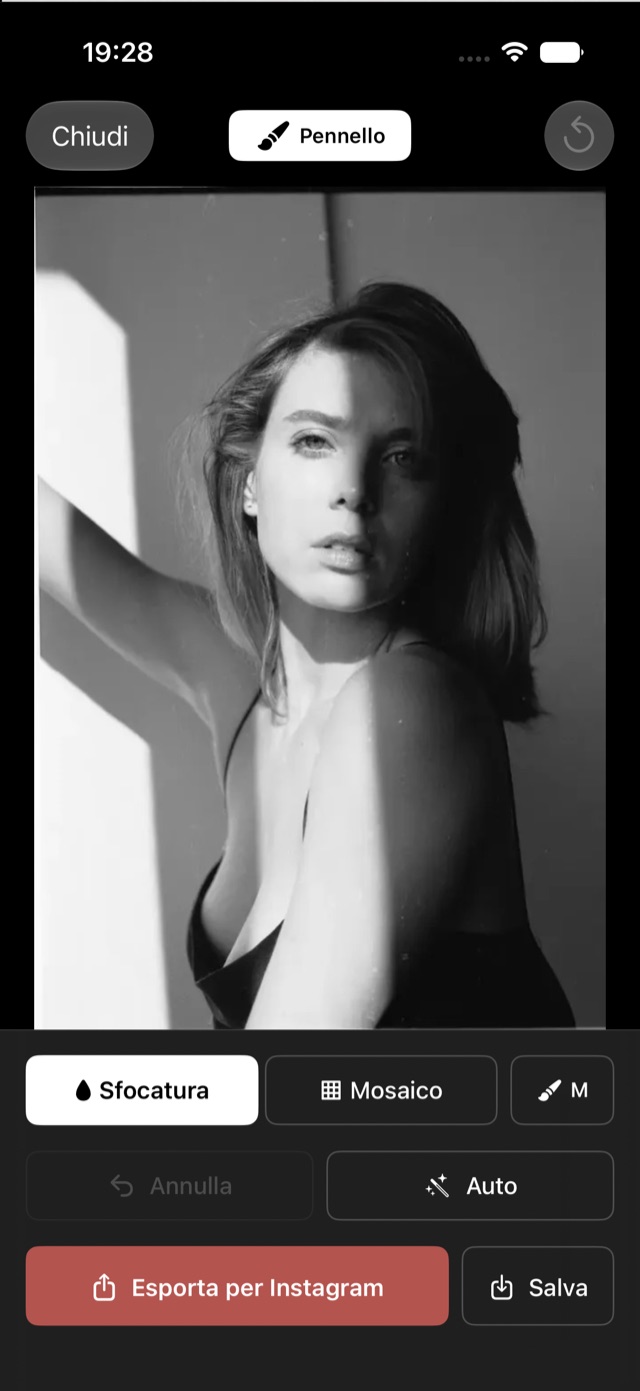
Cover with your finger, export ready for Instagram.
Blur or mosaic, S/M/L brush, zoom up to 4× for small details. “Auto” tries to suggest areas to cover on its own; you can adjust them with your finger. The preview is already the final file.
- Blur or mosaic, pixel-precise
- Automatic suggestions for areas to cover
- 4:5 Post or 9:16 Story formats, ready for Instagram
Try it